Item Name Syntax
DeviceName.Address[index]*,Datatype,LowRaw,HighRaw,LowEng,HighEng,RequestedDataType
Everything after the Address is optional.
| Device Name |
Name of the Device |
|---|
| Address |
Protocol specific variable name |
|---|
| [index] |
Specify array.
eg. device1.40001[10] is a ten element vector,
device1.40004[10][10] is a 10x10 array.
If no index is specified then only one item is defined. |
|---|
| Datatype |
Possible raw data types are
| BOOL |
Boolean (1 bit) |
|---|
| I1 |
Signed byte (8 bits) |
|---|
| UI1 |
Unsigned byte (8 bits) |
|---|
| I2 |
Signed word (16 bits) |
|---|
| UI2 |
Unsigned word (16 bits) |
|---|
| I4 |
Signed long (32 bits) |
|---|
| UI4 |
Unsigned long (32 bits) |
|---|
| BSTR |
Variable Length String |
|---|
| I8 |
Signed Large (64 bits) |
|---|
| UI8 |
Unsigned Large (64 bits)
|
|---|
| R4 |
Short floating point (32 bits) |
|---|
| R8 |
Long floating point (64 bits) |
|---|
| Currency |
Currency (64 bits) |
|---|
| Date |
Date (64 bits) |
|---|
| Int |
Int (32 bits) |
|---|
| Uint |
Uint (32 bits) |
|---|
| BCD |
BCD (16 bits) |
|---|
| LongBCD |
Long BCD (32 bits) |
|---|
| LargeBCD |
Large BCD (64 bits) |
|---|
|
|---|
| Low Raw |
Low limit of data from PLC |
|---|
| High Raw |
High limit of data from PLC |
|---|
| Low Eng |
Low limit of data from User |
|---|
| High Eng |
High limit of data from User |
|---|
| Requested Data Type |
Convert raw data type to the requested data type |
|---|
The LowRaw,HighRaw,LowEng and HighEng are optional and are used to specify the scaling to be performed when reading and writing to the PLC. e.g. Modbus0.40001,,0,9999,0,100 to scale the variable to display percentage.
Adding Tags
There is usually no need to add tags to the server. The whole data address space of the device is always directly addressable. e.g. If you have a Modbus device 'Device1' and you want to access 40002. Use the itemID Device1.40002. The access path is not used. Use the built-in OPC explorer to connect to IOServer. You will see the addressing format for the device via the browser interface when you try to add an item to a group.
If the user wants to enforce their naming convention, they can drag and drop tag definitions into the "Tags List" folder in IOServer. Click on the "Tags List", then drag your tags list from Wordpad, Word, or any drag and drop enabled application and drop it into the Tags List folder. To export data from IOServer press the CTRL key, left mouse click the folder, and drag it into your document. For Tags List, the first field is the user tag name, the second field is the variable name. The type and comment fields are optional user data that are not used by IOServer. The fields are tab-separated. All user-defined tags are grouped in the "Tags" device.
eg. to configure your own tree structured tag names.
Use wordpad.exe (or Word) to type in your tag list
PID100.MODE Device1.40004
PID100.MV Device1.40001
PID100.OP Device1.40005
PID100.PV Device1.40003
PID100.SP Device1.40002
Click on the Tags List folder in IOServer. Select the above lines and drag them to the Tags List folder in IOServer. IOServer should now have the 5 User tags defined.
From Excel you should be able to see the following tags
IOSDDE|Group!'PID100.PV'
IOSDDE|Group!'PID100.SP'
IOSDDE|Group!'Device1.40005'
IOSDDE|Group!'Device1.30001'
The "Tags." prefix may be omitted when using tags from the tags list.
Edit Tag List
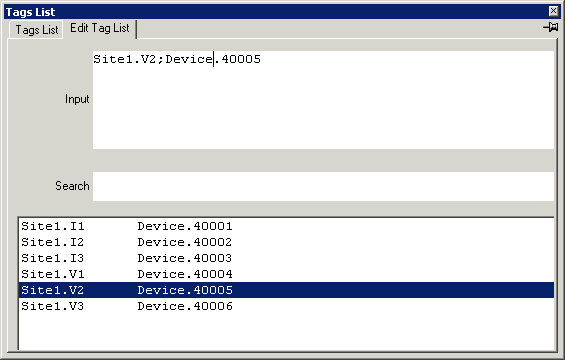
| Input |
Editing box. Text can be paste in here from the clipboard. |
|---|
| Search |
Search String |
|---|
Keyboard short cuts
| ShortCuts | Description |
|---|
| ctr + x |
Delete line, Push it to deleted stack and clipboard
|
|---|
| ctr + v |
Paste line, Insert before current position from deleted stack
|
|---|
| ctr + c |
Copy line, Push it to deleted stack and clipboard
|
|---|
| ctr + d |
Delete line |
|---|
| ctr + e |
Copy all lines to clipboard |
|---|
| ctr + + |
Increase font size by 5% |
|---|
| ctr + - |
Decrease font size by 5% |
|---|
| F3 |
Search Go to the next line that matches the characters typed in the search box
|
|---|
| Enter |
Add lines to tag list |
|---|
| Home |
Go back 500 lines |
|---|
| Page Up |
Go back 50 lines |
|---|
| Up |
Move up one line |
|---|
| Down |
Move down one line |
|---|
| Page Down |
Move forward 50 lines |
|---|
| End |
Move forward 500 lines |
|---|
| Escape |
Clear input |
|---|
Tag Browsing
IOServer can access the whole address space of a device. Instead of enumerating all possible variable address in the device, IOServer use a hint system to show the user what address range and type is possible for all the possible addresses of a device.
examples
| %05u(1-65536) |
Expect a five digit decimal number between 1 and 65536 |
|---|
| %02u(1-32) |
Expect a 2 digit decimal number between 1 and 32 |
|---|
| %01u(1-8) |
Expect a 1 digit decimal number between 1 and 8 |
|---|
| %u(0-65535) |
Expect a decimal number between 0 and 65535 |
|---|
| %u(0-255) |
Expect a decimal number between 0 and 255 |
|---|
| %u(7-999) |
Expect a decimal number between 7 and 999 |
|---|
| %o(0-277) |
Expect an octal number between octal 0 and octal 277 |
|---|
| %x(0-1fff) |
Expect a hexadecimal number between 0 and 1fff |
|---|
System Device Variables
These variables are available in every device.
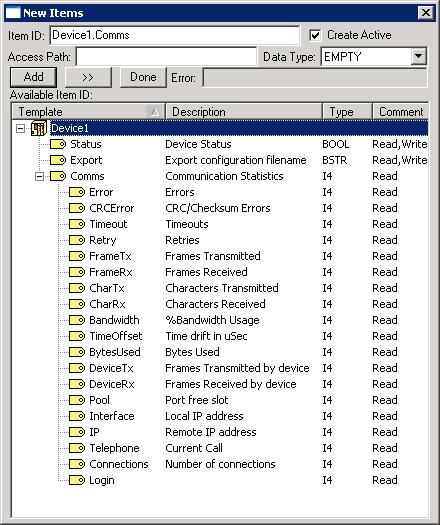
| Status |
Return a value of 0 if the device is offline. A value of 1 if the device is online. Writing a 0 to this variable will disconnect the parent port. Writing a 1 to this variable will reconnect the parent port. |
|---|
| Export |
Export the entire configuration of IOServer to the text file specified by writing to this variable |
|---|
| Comms |
Port Communication Statistics. Statistics Error to CharRx can be reset to 0 by writing any value to that variable. Individual device statistics are not available.
| Error |
Number of communication errors |
|---|
| CRCError |
CRC/Checksum error detected |
|---|
| Timeout |
Number of timeout |
|---|
| Retry |
Number retries attempt |
|---|
| FrameTx |
Number of frames transmitted |
|---|
| FrameRx |
Number of frames received |
|---|
| CharTx |
Number of characters transmitted |
|---|
| CharRx |
Number of characters received |
|---|
| Bandwidth |
% Bandwidth usage of port. |
|---|
| TimeOffset |
Time difference in microseconds between IOServer internal clock and operating system clock. Use Long to read this variable. |
|---|
| Bytes Used |
Total number of bytes by all OPC Clients |
|---|
| DeviceTx |
Number of frames transmitted by device |
|---|
| DeviceRx |
Number of frames received by device |
|---|
| Interface |
Local IP address |
|---|
| IP |
Remote IP Address |
|---|
| Telephone |
Telephone number of active outgoing call.
| Value | Meaning |
|---|
| Phone Number |
Connected to this number |
|---|
| Negative number |
Connecting to this number |
|---|
| 1 |
DCD asserted with no current outgoing call |
|---|
| 0 |
Not connected |
|---|
|
|---|
| Connections |
Number of concurrent connections |
|---|
| Logins |
Number of logins received |
|---|
|
|---|
Using IOServer with Wonderware Intouch |