IOServer DDE interface |
Application NameIOSDDE
Topic NameAny Topic Name will be accepted as valid. Should allocate a topic for each device. Update RateThe initial update rate of all Topics is IOServer Preferences->DDE Settings->Update Rate. The update of each Topic can be individually set by writing to IOSDDE|TOPIC!UPDATERATE. e.g. Poking 100 to IOSDDE|RTU12!UPDATERATE will set the update rate for Topic "RTU12" to 100ms. Using IOServer with ExcelTo display a 10x10 array from the Modbus Device 'Master'. 1. Select a 10 by 10 area. 2. Type in =IOSDDE|modbus!'Master.40001[10][10]' 3. Press Ctrl-Shift-Enter 
Example of a function to write the value at worksheet OPC.A4 to "Master.40001" Sub TagWrite()
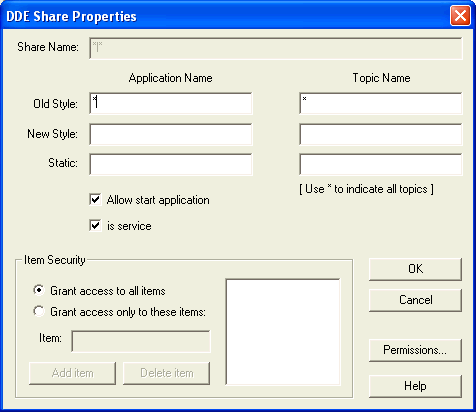
Using NetDDE from Excel in Windows 2000/XP/NT4Server Configuration1. Run %SystemRoot%System32\ddeshare.exe on the computer on which IOServer is running. 2. Add a share in the Shares.DDE Shares.
3. Set Trusted Share Properties in Shares.Trusted Shares. 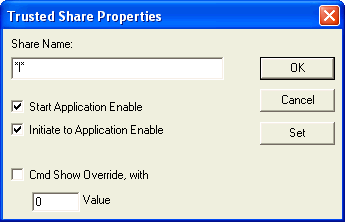
4. Load mbtcp.io into IOServer. Client ConfigurationEnter the following into a cell in Excel
Where Gateway is the DDE Server Machine name 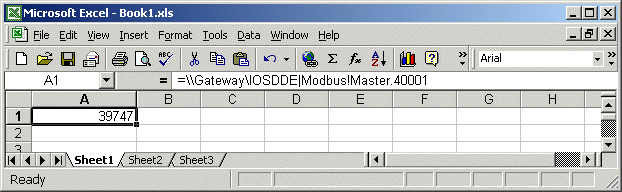 |
| © Copyright IOServer Pty Ltd. All rights reserved. |
| ✉ sales@ioserver.com 📞+61 2 9805 0356 (Australia) |
|
Last updated: Thu, 16 Jun 2022 08:01:55 GMT |