IEC 61850/61400-25 OPC Server Configuration Guide | |||||||||||||||||||||||||||||||||||||||||||||||||||||||||||||||||||||||||||
|
Designed to read and write to IEC 61850/61400-25 Servers. IEC 61850 is based on MMS (Manufacturing Message Specification, ISO 9506). Only the TCP/IP profile is supported. GOOSE is not supported. This IEC 61850 client can handle any current or future data models (IEC 61400-25 for wind turbines, IEC 62344 for Hydroelectric power plants and IEC62350 for Distributed Energy Resources (DER)). The SCL (System Configuration Language) file is not required because the data model is extracted from the device when the device first comes online. Channel Configuration
Device Configuration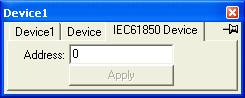
Variable Types
Double bitsYou can read and write to these multiple bit values as a single byte value by post-fixing the tag name with ",UI1"
Control ModelWhen writing to .ctlVal, the .ctlModel in the "CF" structure for that item determines the security method used. If the .ctlModel is 4 (SBO with enhanced security), the write to the Oper structure is preceded by a write to the SBOw structure. If you want to use "SBO with normal security" for writes to a .ctlVal, then set the .ctlModel of the associated CF structure to 2.
File Transfer from deviceWriting an empty string to .File will return the name of the next file to be transferred in .File. Writing the filename of the file to be extracted to .File will cause that file to be extracted. An empty .File will be reported when the file is finally extracted. Writing a directory name terminated by '\' will cause fileDirectory request to be issued. In the OPC Gateway set "Device.File = Device.File". This will cause all unextracted files from the top level directory to be extracted whenever the OPC client writes an empty string to .File. All files extracted will be stored under the Browse Directory. A file is considered unextracted if its timestamp is newer than a file of the same name in this directory. Multiple reads and writesPort.Max Input Queue Length controls the maximum number of read or write requests that can be packed into each MMS read or write request. IOServer will automatically stop polling for an item if it receive an unsolicited InformationReport for that item. SOE Logging formatSOE logging is enabled by setting a valid directory in Log File.SOE File Path
|
| © Copyright IOServer Pty Ltd. All rights reserved. |
| ✉ sales@ioserver.com 📞+61 2 9805 0356 (Australia) |
|
Last updated: Thu, 16 Jun 2022 08:01:58 GMT |