|
Simple Network Management Protocol for monitoring of managed/un-managed network equipments. SNMP v1 and v2c devices are supported.
Windows SNMP Service must be installed and configured. The security settings of the computer must allow the transmission and reception of ICMP (Internet Control Message Protocol) messages.
Channel Configuration
Select SNMPPort.Port when adding a board.
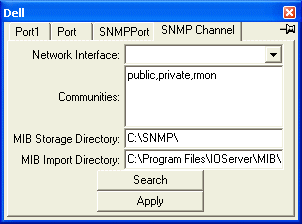
| Network Interface |
Use the address range of this network interface for searching. Click on the drop down button to see the list of available network interfaces. |
|---|
| Communities |
SNMP passwords to use for search. |
|---|
| MIB Storage Directory |
Store MIB files for each device to this directory. On device startup, if device MIB file is empty the driver will import the MIB (Management Information Base) from the device, otherwise the MIB is loaded from the file. All objects including traps will be save to the file on device shutdown, or when new traps are reported. |
|---|
| MIB Import Directory |
All files in this directory will be used to translate Object Identifiers to names. Email us these files and all the files in the MIB Storage Directory if you want us to incorporate these files into the SNMP driver in future releases. |
|---|
| Search |
Click to search for devices between the range of IP addresses.

Click on the first tab of this port to see the progress of the search. Up to 65535 IP addresses can be searched at any one time.
| IP Addresses From |
Search from this address |
|---|
| To |
to this address |
|---|
| Search Delay |
Delay between each address |
|---|
| Search Threads |
Maximum number of threads created to perform the search in parallel |
|---|
| Random Search |
Random search instead of sequential search |
|---|
|
|---|
Device Configuration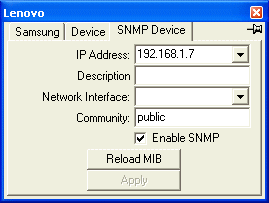
| IP Address |
Address of the remote device. Click on the drop down button to see the list of unconfigured devices found previously with search. Devices with '?' suffix are devices that support SNMP. Devices already configured are not shown. |
|---|
| Description |
User description of device. |
|---|
| Network Interface |
Use this network interface for this connection. If blank the operating system will choose. Click on the drop down button to see the list of available network interfaces. |
|---|
| Community |
SNMP password. |
|---|
| Enable SNMP |
If disabled only the RoundTripTime will be available. |
|---|
| Reload MIB |
Delete the MIB file and re-import the MIB from the device. |
|---|
Variable Types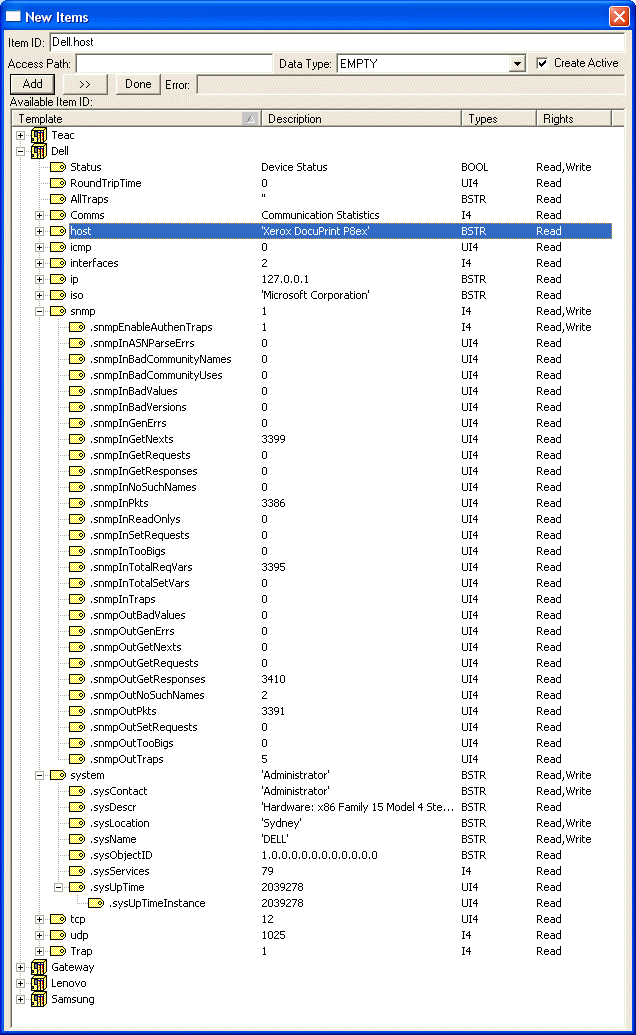
RoundTripTime is the time in microseconds it takes for the device to respond to a ping request.
AllTrap will capture all traps from this device.
The scan rate is controlled by the OPC client Group Update interval.
Traps received are under "Trap".
The ios.org.dod.internet.mgmt.mib-2 and iso.org.dod prefixes are suppressed to make browsing more convenient.
Multiple reads and writes
Port Max Input Queue Length controls the maximum number of read or write requests that can be packed into each read or write request. |